The Best AI Interview Assistant for Mac in 2026: What to Look For (and Why Native Beats a Browser Tab)
Search for the best AI interview assistant for Mac and you get a wall of tools that all claim the same things. The honest version of that question is narrower than the listicles make it look, because most of those tools are not really Mac apps. They are web apps or browser extensions that happen to open on a Mac — and in a live interview, that difference is the whole game.
So this is a buyer's guide, not a top-ten. It lays out the criteria that actually decide whether a Mac interview copilot helps you or quietly works against you, and then it is honest about how interviewco.ai meets each one — including the one real requirement it depends on. Use the checklist on any tool you are weighing, ours included.
Two kinds of “Mac” tool
There is a meaningful split inside this category that the marketing flattens:
- Browser-based. A Chrome extension or a web app you keep open in a tab. It captures interview audio by reading a meeting tab or by asking you to route your sound through a virtual audio driver, and it shows answers inside that same browser.
- Native. A real macOS application that talks to the operating system directly — captures audio through Apple's own audio API, draws its own window, and does not depend on a browser being open at all.
Both will run on your Mac. But the browser route inherits every weakness of living inside a tab: it has to be the right tab, it often needs a driver installed into your sound settings, and the answer renders in the same place you are sharing or being watched. The native route avoids all three. That is why the rest of this guide treats “is it actually native” as the first question, not a footnote.
What actually matters in a Mac interview copilot
Six criteria do most of the work. In rough order of how much they matter live:
- How it captures the interview audio
- Where the answer shows up
- Where the answer comes from
- Latency you can actually verify
- Billing you can trust
- Where your résumé data lives
The sections below take them one at a time.
1. How it captures the audio: Core Audio vs a browser tab
This is the criterion competitors get wrong most often, because the easy way to capture interview audio is also the most fragile: read a meeting tab in the browser, or make you install a virtual audio driver to reroute your sound. Both add moving parts, and the browser-tab approach ties the whole tool to one window being focused.
A native Mac app can take a cleaner route. interviewco.ai captures system audio through Apple's Core Audio Tap — the same API macOS exposes for legitimate audio capture (macOS 14.4 and later). Stated as specs rather than promises, that means three concrete things:
- No browser tab. It works with whatever app you take the call in — Zoom, Google Meet, a phone on the desk — because it listens at the system level, not inside one website.
- No virtual audio driver. Nothing to install into your sound settings; the capture uses the OS API directly, so there is no loopback or BlackHole-style device in the chain.
- No bot in the call. It does not join your meeting as a participant or appear in the attendee list. It listens to the audio your own machine is already outputting.
What to ask of any tool: how does it actually hear the interview? If the answer is “a browser extension” or “install this audio driver,” you are buying the fragile path on a Mac that did not require it.
2. Where the answer shows up: an overlay, or a separate iPhone
An answer is only useful if you can read it without breaking your eye line or your train of thought. A native Mac app gives you choices a browser tab cannot.
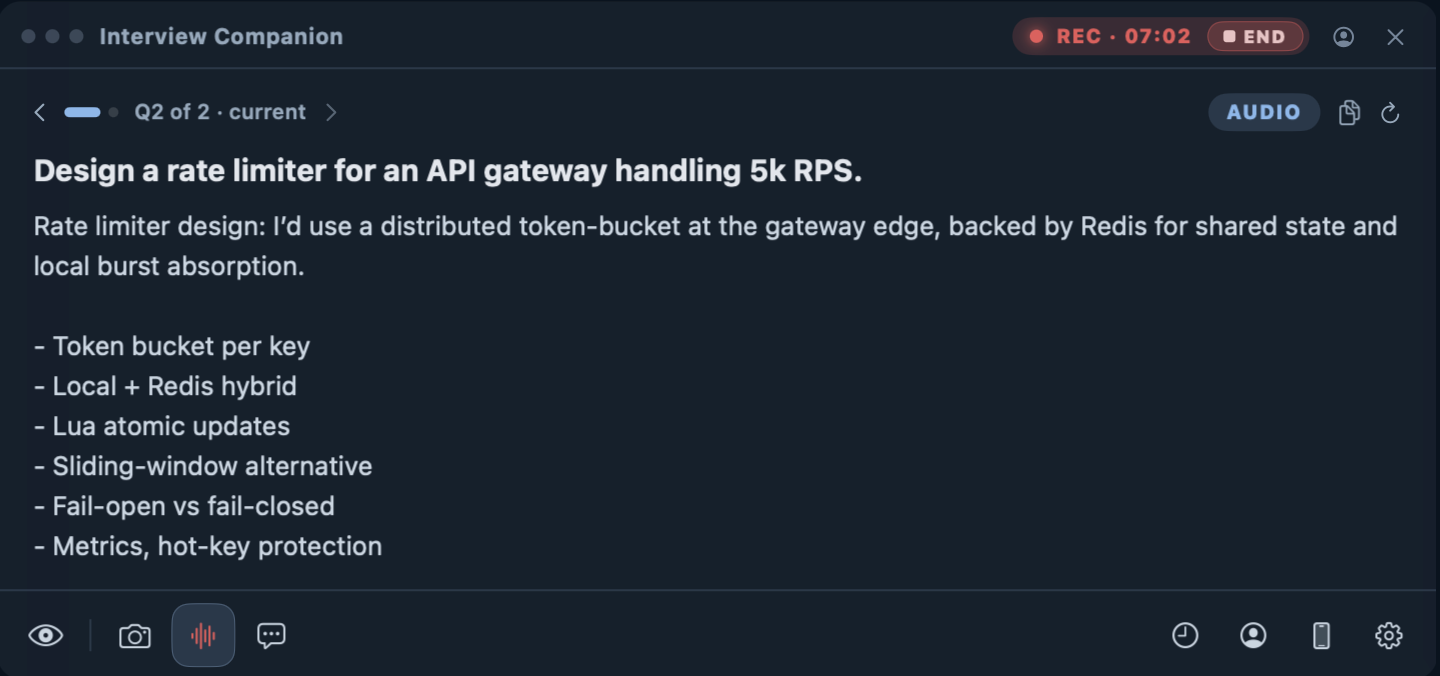
The Mac overlay is a small translucent window that sits on your screen and shows the transcribed question with the answer streaming underneath. It is the fastest path when you are working on one machine and want everything in one glance.
The iPhone companion is the option people ask about most. You pair a phone over your local network — scan a QR code once — and the same answers appear there. The phone is a genuinely separate device acting as a second screen, which means the answer does not have to live on the computer you are interviewing on at all. It becomes a glance down at your own phone, the way you would glance at notes. A browser-extension tool, by definition, renders the answer in the same browser you are sharing.
3. Where the answer comes from: your résumé, not a generic script
The most common complaint across this whole category is that the answers sound like a chatbot reciting a template — confident, generic, and obviously not yours. That is a function of where the answer comes from, not which Mac you run it on.
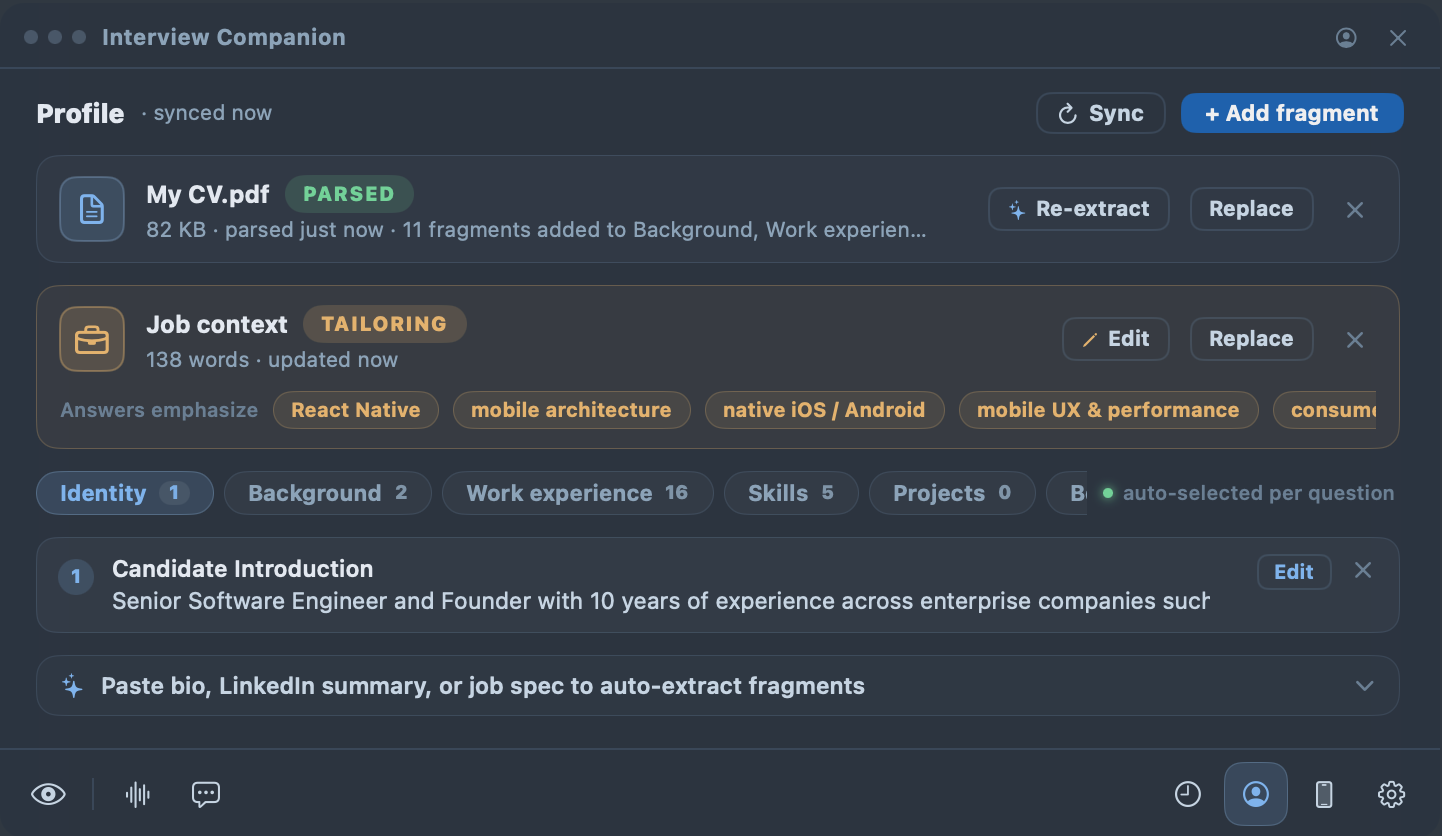
interviewco.ai generates each answer against your profile. When you set up, your résumé is parsed into structured fragments — experience, projects, skills, behavioral stories — and the job posting you paste becomes role context. At answer time, the pieces relevant to the question are pulled into the prompt, so the response is anchored to work you actually did and the role you are actually interviewing for. That is the whole reason an answer can come out sounding like you rather than like a search box.
What to ask of any tool: does it read my background, or just the question? A copilot that only sees the question can only give you the average answer the internet would.
4. Latency you can actually verify
Every tool in this category advertises a latency number, and the numbers are usually best-case marketing rather than what you feel mid-interview. A delay that is fine in a demo is a stare you cannot explain when a real interviewer is waiting.
The honest criterion is not “whose number is smallest” — it is whose number you can verify. Look for a measured median (a P50), ideally with a stopwatch in frame on a real question, not a sub-second figure with no methodology. Treat unverifiable speed claims the way you would treat any other unsourced number.
5. Billing you can trust
This belongs in a buyer's guide because it is where a lot of this category has earned bad reviews: auto-renewing charges that are hard to escape, refunds that exist on paper only, support that never answers. Those are real, public complaints about real products, and they matter more than a feature checkbox when you are about to hand over a card.
So check the unglamorous things before you buy any of them: Is the price shown plainly, with no fake-discount countdown? Can you cancel in one place without emailing support? Is the refund policy written in plain language? interviewco.ai is built to pass those checks rather than to trip you on them — transparent pricing, cancel anytime, and a real person behind support.
6. Where your résumé data lives
Your résumé is some of the most personal data you have, so where a Mac app keeps it is a fair question. interviewco.ai is local-first: the profile lives on your Mac as plain, human-readable files you can open and audit, and signing in syncs it to your own account only so your devices can see it. Per our privacy policy, we do not sell personal information, run advertising trackers, or train models on your content without your separate, explicit opt-in.
A browser-based tool that uploads everything to a server you cannot see is a different trust proposition — not automatically wrong, but worth knowing before, not after.
The honest caveat: it needs macOS 14.4
The native audio path depends on Apple's Core Audio Tap, which Apple shipped in macOS 14.4. On anything older, that capture is simply not available — and rather than pretend otherwise, the app falls back to its screenshot-solve mode: a global hotkey (hold Option for three seconds) captures the current screen, reads the problem, and solves it through the same profile-grounded pipeline. That covers whiteboard problems, shared coding pads, and take-homes on any Mac, audio or not. If you are on 14.4 or later, you get both paths; if you are not, you get the screenshot path. That is the trade-off, stated plainly.
The checklist, in one place
When you compare any AI interview assistant for Mac — this one included — ask:
- Is it a native macOS app, or a browser extension running on a Mac?
- Does it capture audio through the OS, or need a tab / virtual driver / bot?
- Can the answer appear off the interview machine — e.g. on a separate phone?
- Is the answer grounded in your résumé, or just the question?
- Is its latency a verifiable measured number, or marketing?
- Is the billing transparent — clear price, easy cancel, plain refund policy?
- Does your résumé stay local and unsold?
What it is — and what it is not
interviewco.ai is a preparation and live-assistance tool for real candidates. It helps you answer questions about your background faster and more clearly. It does not learn your craft for you, invent experience you do not have, or sit an interview on someone else's behalf — it is built for people interviewing as themselves, not for impersonation of any kind.
FAQ
Is there a native AI interview assistant for Mac?
Yes. interviewco.ai is a native macOS app, not a browser extension or a web page you keep open. It captures system audio through Apple’s Core Audio Tap, shows answers in a translucent Mac overlay or on a paired iPhone, and builds each answer from a profile made from your own résumé.
What version of macOS does it need?
System-audio capture uses Apple’s Core Audio Tap API, which requires macOS 14.4 or later. On older macOS, or if you decline the system-audio permission, the app falls back to a screenshot-solve mode triggered by a global hotkey, so it still works without the audio path.
Does a Mac interview assistant need a browser extension or a virtual audio driver?
interviewco.ai needs neither. It captures the audio your Mac is already playing through the operating system’s own audio API, so there is no browser tab to share and no third-party virtual audio driver (such as a loopback or BlackHole-style device) to install into your sound settings.
Does it work with Zoom, Google Meet, and other call apps on a Mac?
Yes. Because it listens at the system-audio level rather than inside one website, it works with whatever app you take the call in — Zoom, Google Meet, a browser tab, or a phone propped on the desk. It does not join the meeting as a participant and does not appear in the attendee list.
Can I read the answers on my iPhone instead of my Mac?
Yes. You can pair an iPhone over your local network by scanning a QR code once, and the same answers appear there. The phone is a separate device acting as a second screen, so the answer does not have to appear on the Mac you are interviewing on.
Where does my résumé data live on a Mac?
Your profile is stored on your Mac as plain, human-readable files you can open and audit. Signing in syncs it to your own account so your devices can see it. Per the interviewco.ai privacy policy, your content is not sold, not used for advertising trackers, and not used to train models without your separate, explicit opt-in.
That is the whole checklist: native capture, an answer you can read off the interview machine, grounded in your own résumé, on terms you can verify. The best way to judge any of these tools is to run it on a Mac, on a question you already know the answer to, and see how close it gets to how you would say it.