How a Real-Time Interview Copilot Actually Works on a Mac
Before anyone trusts a tool in a live interview, they want to know two things: where does the answer come from, and where does it show up?
Those are fair questions, and most “AI interview assistant” pitches skip them. So this post answers them directly. It walks through exactly how the interviewco.ai live copilot works on a Mac — from the moment the interviewer starts talking to the moment an answer is in front of you — and is honest about what each part does and does not do.
The whole loop, in one breath
Four things happen, in order, every time the interviewer asks something:
- Hear it. The app captures the audio your computer is already playing and detects when a question has been spoken.
- Read it. That speech is transcribed into a clean question, with technical terms from your field biased to come out right.
- Answer it. The question is solved against a profile built from your résumé and the job you are targeting, so the answer is grounded in you — not a generic template.
- Show it. The answer streams to wherever you chose to read it: a quiet overlay on your computer, or your iPhone as a separate second screen.
The rest of this post is just those four steps, slowed down.
1. It hears the interview — without touching your setup
This is the part competitors get wrong most often, because the easy way to capture interview audio is also the most fragile: open the call in a browser tab and read the page, or make you install a virtual audio driver to reroute sound. Both leave traces, and the browser-tab approach is the single most common way these tools get noticed.
interviewco.ai takes the native route instead. On macOS 14.4 and later it captures system audio through Apple's own Core Audio Tap — the same API the operating system exposes for legitimate audio capture. That means three concrete things, stated as specs rather than promises:
- No browser tab. It works with whatever app you take the call in — Zoom, Meet, a phone screen on the desk — because it listens at the system level, not inside one website.
- No virtual audio driver. Nothing to install into your sound settings; the capture uses the OS API directly.
- No bot in the call. It does not join your meeting as a participant or show up in the attendee list. It listens to the audio your own machine is already outputting.
From there, a voice-activity detector segments the stream on silence, so the app waits for a complete question instead of reacting to half a sentence. (On a Mac older than 14.4, or if you decline the system-audio permission, the copilot still runs — it just falls back to the screenshot path described below.)
2. It turns speech into a question — and an answer that sounds like you
Each segmented question is transcribed to text. Before that happens, the app assembles a short list of domain terms from your active profile — the frameworks, tools, and proper nouns in your field — and biases the transcription toward them, so “Rust” doesn't come back as “rust” and your stack's names survive intact.
Then comes the part that actually separates a copilot from a search box: the answer is generated against your profile. When you set up, your résumé is parsed into structured fragments — experience, projects, skills, behavioral stories — and the job posting you paste becomes role context. At answer time, the pieces relevant to the question are pulled into the prompt, so the response is anchored to work you actually did and the role you are actually interviewing for. That is the whole reason an answer can come out sounding like you rather than like a chatbot reciting a template.
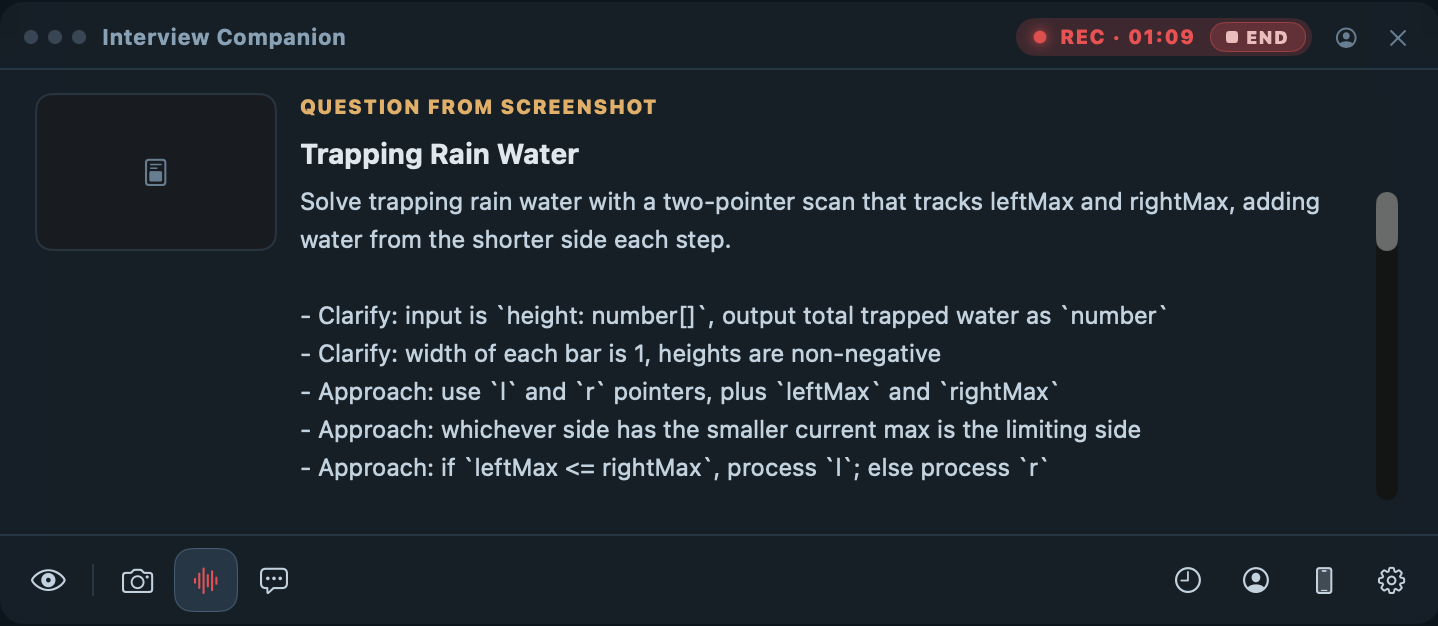
The app also notices when a question is a coding problem and shapes the answer accordingly — a brief summary, clarifying assumptions, an approach, then the code — instead of a wall of prose you would have to talk around.
3. You choose where the answer shows up
An answer is only useful if you can read it without breaking your eye line or your train of thought. interviewco.ai gives you two places to put it, and you pick per your setup.
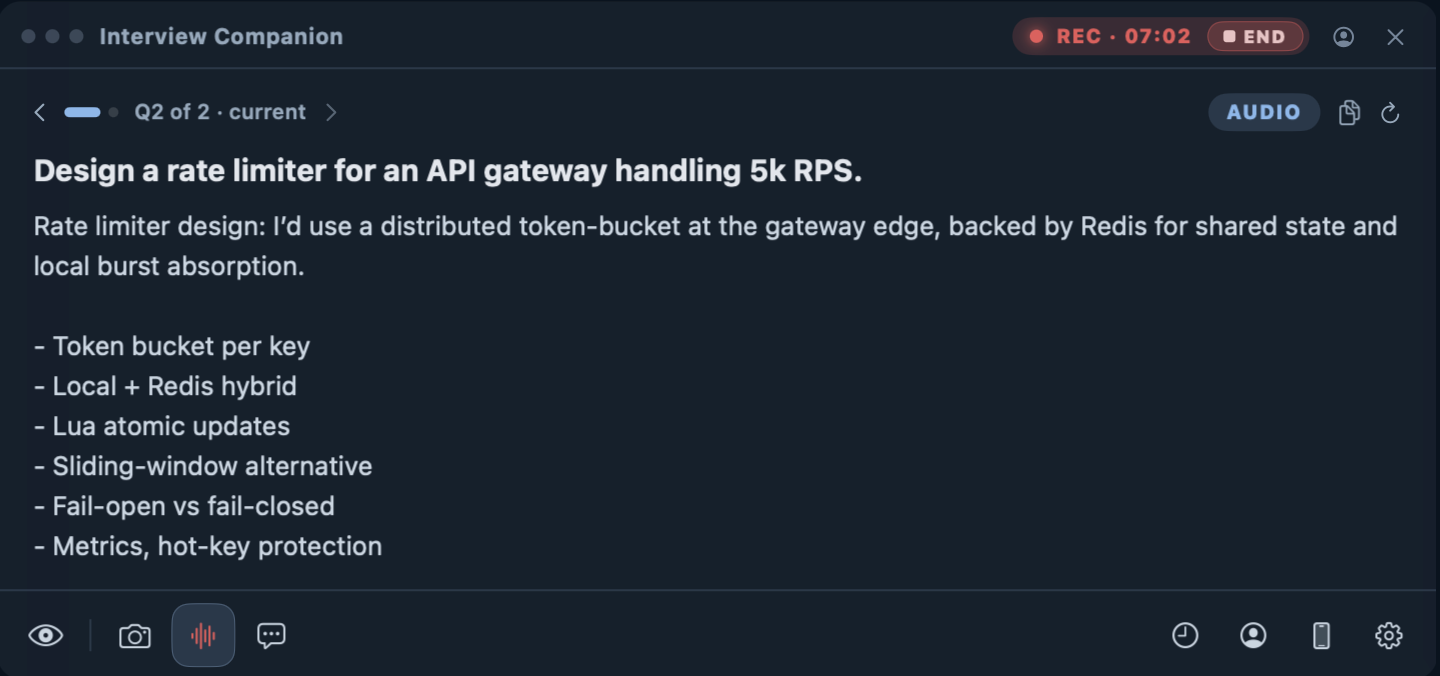
The Mac overlay is a small translucent window that sits on your screen and shows the transcribed question with the answer streaming underneath. It is the fastest path when you are working on one machine and want everything in one glance.
The iPhone companion is the other option, and it is the one people ask about most. You pair a phone over your local network — scan a QR code once — and the same answers appear there. The phone is a genuinely separate device acting as a second screen, which means the answer does not have to live on the computer you are interviewing on at all. For a lot of candidates that distinction is the whole reason they relax: it is a glance down at your own phone, the way you would glance at notes.
It is shaped to be spoken, not pasted
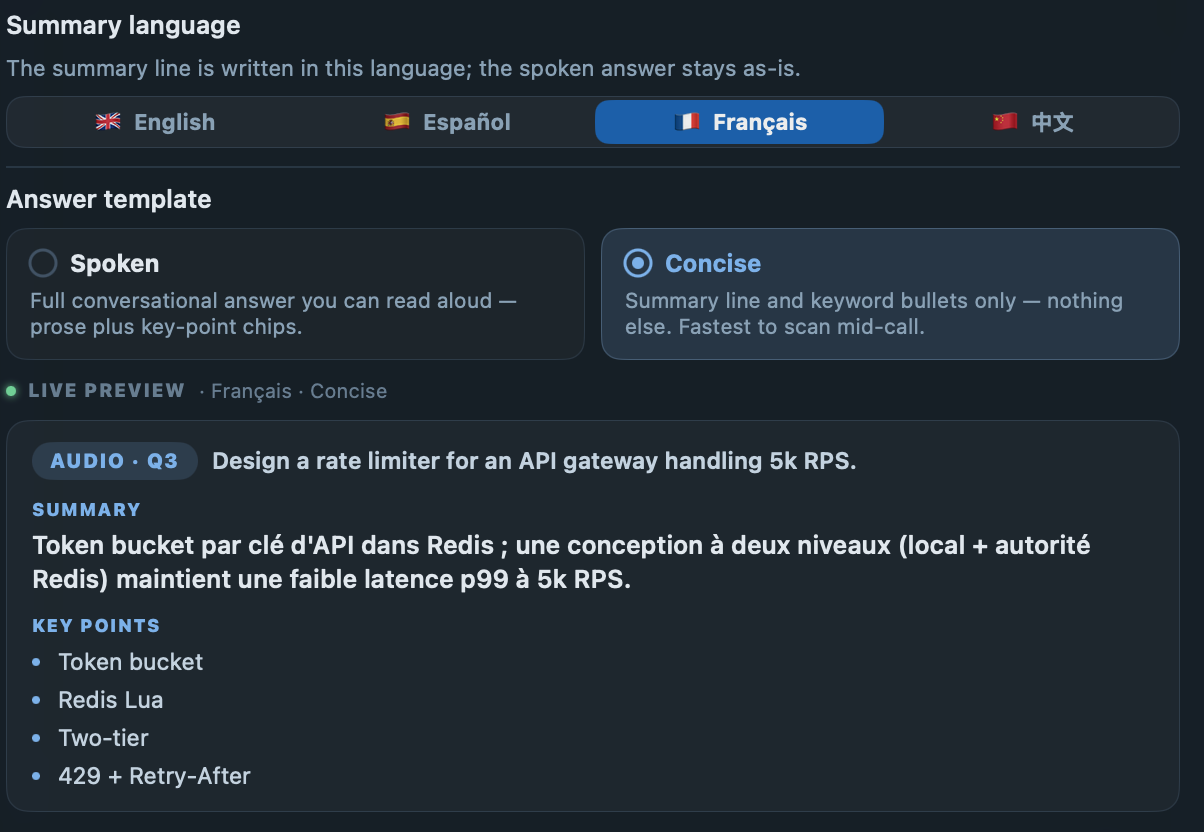
A copilot that hands you an essay is useless when you have three seconds to start talking. So the output is tuned for the voice. A Spoken mode writes the answer the way you would actually say it; a Concise mode collapses non-coding answers to a one-line summary plus a few keyword bullets you can riff from. And because not everyone interviews in English, the leading summary line can be localized to your language while the answer itself stays in the interview's — a small lever that matters a lot to non-native speakers carrying the extra tax of parsing and answering at once.
The other path: screenshot solve
Not every interview is audio. Whiteboard problems, a shared coding pad, a take-home prompt on screen — for those there is a global hotkey: hold Option for three seconds and the app captures the current screen, reads the problem, and solves it through the same profile-grounded pipeline. It is also the full fallback on older Macs where system-audio capture is not available, so the tool still earns its keep without the microphone path.
What it is — and what it is not
interviewco.ai is a preparation and live-assistance tool for real candidates. It helps you answer questions about your background faster and more clearly. It does not learn your craft for you, invent experience you do not have, or sit an interview on someone else's behalf — it is built for people interviewing as themselves, not for impersonation of any kind.
Your résumé is some of the most personal data there is, so it stays with you: the profile lives on your computer as plain, human-readable files you can open and audit, and signing in syncs it to your own account only so your devices can see it. Per our privacy policy, we do not sell personal information, run advertising trackers, or train models on your content without your separate, explicit opt-in.
FAQ
How does a real-time interview copilot work?
It listens to the audio your computer is already playing during a call, turns the interviewer’s speech into text, and generates a suggested answer that you read while you talk. interviewco.ai runs that loop on a Mac: it captures system audio through Apple’s Core Audio Tap, splits speech into questions, transcribes them, and produces an answer grounded in a profile built from your own résumé and target job.
Does interviewco.ai open a browser tab or install a virtual audio driver?
No. It captures system audio natively through macOS Core Audio (the Core Audio Tap API, macOS 14.4 and later), so there is no browser tab to share and no third-party virtual audio driver to install. On macOS older than 14.4, or if you decline the system-audio permission, it falls back to a screenshot-only mode.
Does it join my video call as a participant?
No. It does not add a bot to the meeting and does not appear in the attendee list. It listens to the audio your own Mac is outputting through the call you are already in.
Can the answer appear on my phone instead of my computer?
Yes. You can pair an iPhone over your local network and read answers there. The phone is a separate device acting as a second screen, so the answer does not have to appear on the computer you are interviewing on.
What is the difference between the Mac overlay and the iPhone companion?
The overlay is a small translucent window on your computer that shows the transcribed question and the streaming answer. The iPhone companion shows the same answers on a paired phone over your local network. They are two places to read the same output; you choose which fits your setup.
Who is interviewco.ai built for?
It is built for real candidates preparing for and answering their own interviews. It works from your own résumé and helps you say what you actually know; it does not impersonate anyone, sit an interview on someone else’s behalf, or fabricate a background you do not have.
That is the entire loop: native audio in, a question read cleanly, an answer grounded in your own résumé, shown where you choose to read it. The best way to understand it is to run it on a question you know the answer to and watch how close it gets to how you would say it.