Your Mind Going Blank in an Interview Is Not a Skill Problem
The moment a real interview starts, my mind goes blank.
Heart rate up, two weeks of preparation gone. I mishear a question and freeze. The absurd part: I could not clearly explain a project I built myself. Six years of experience, perfectly comfortable discussing system design with colleagues — and in a real interview, none of it shows up.
If that sounds familiar, here is the thing we kept coming back to while building interviewco.ai: that is not an ability problem, it is a nerves problem. Knowing your craft and performing it under pressure, on camera, in your second language, with a job on the line — those are two different skills. The first one you already have. The second one is trainable, and in the worst moment it can be supported.
This post is about why we built a real-time interview copilot for the desktop, the approach we took (rebuild confidence first, then catch you when you blank), and how the context engineering works under the hood — the profile mechanism, the accuracy loop, and what we do about follow-up questions.
Why we built it
The trigger was watching capable engineers — people who do the job well every day — get filtered out by the performance layer of interviews, in the toughest hiring market in years. The market already has AI interview tools, but two failure modes kept showing up:
- Answers that sound like a chatbot, not like you. Generic model output is easy to recognize: confident, structured, and completely disconnected from your actual resume. An interviewer asks a follow-up about a detail and the whole thing collapses.
- Tools that improvise your background. An assistant that invents projects you never did is worse than no assistant — you cannot defend an experience you do not have.
So the design goal became: answers grounded in your real experience, for real candidates. You still do the preparation. You are still the one who did the work. The copilot's job is to help you practice until the nerves shrink, and — when your brain drops the thread mid-interview — hand you back what you prepared.
The approach
1. Start from who you are: resume in, profile out
Setup is two inputs. Upload your resume (PDF or text) and the app extracts it into a structured profile — your experience, projects, skills, and behavioral stories, each as an editable fragment. Then paste the job posting you are interviewing for, and the role context (company, role, focus areas) is extracted the same way. From that moment every practice question and every live answer is grounded in your background, aimed at that job.
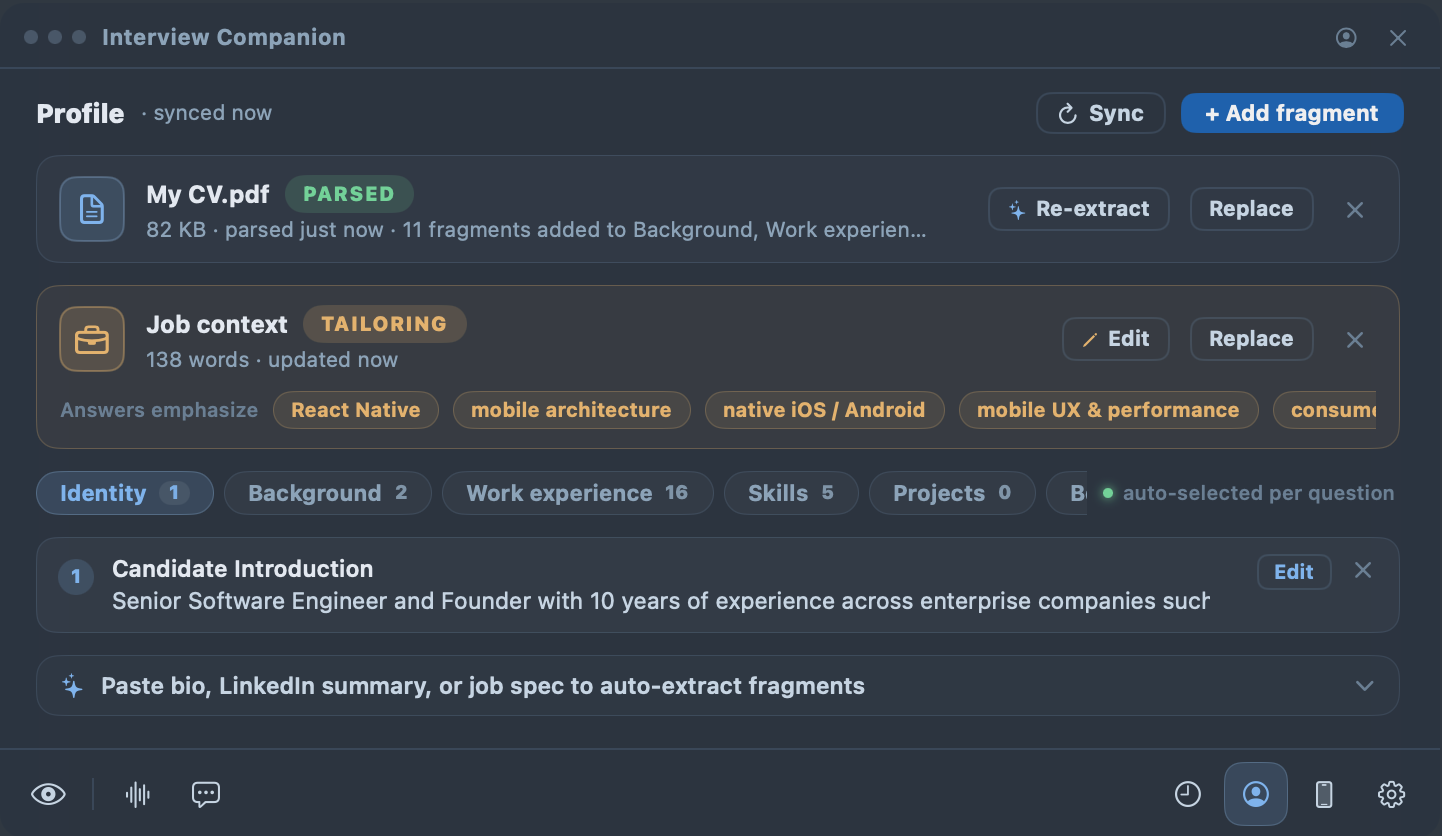
One thing we decided early and refuse to compromise on: this data is yours, and it stays with you. The profile lives on your computer as plain, human-readable files you can open and audit. Your interview answer history is saved locally on your computer too. Signing in syncs the profile to your own account for exactly one purpose — so your iPhone and other devices can see it — and per our privacy policy, we do not sell personal information, run advertising trackers, or use your content to train models without your separate, explicit opt-in. A resume is some of the most personal data there is; a tool asking for it has to earn that.
2. Confidence is trainable: the mock-interview loop
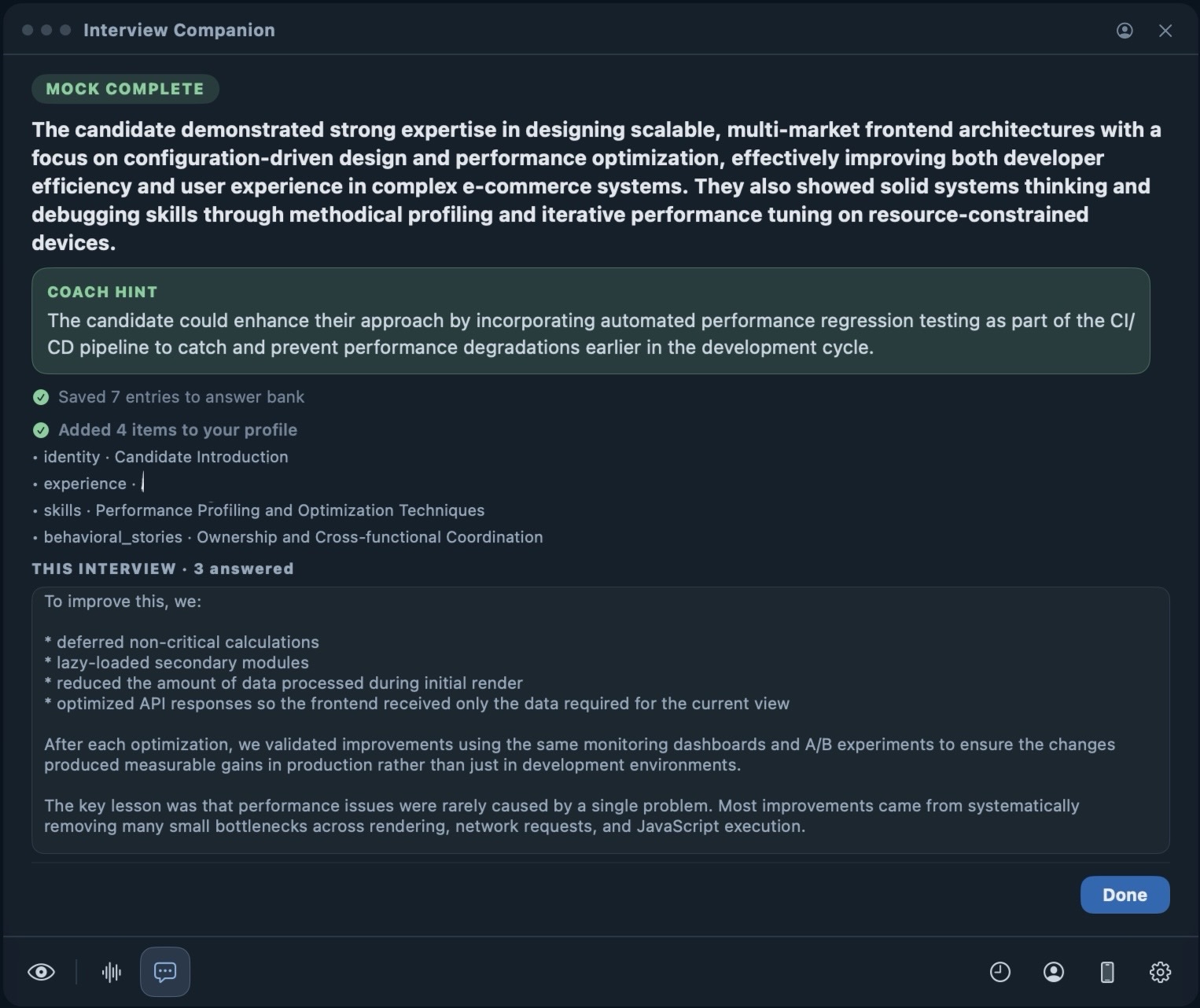
Before any live interview, interviewco.ai's mock interviewer reads your resume and the job description you are targeting, and asks the questions that interviewer would plausibly ask — not random questions from a generic bank. After each answer you get specific feedback: where the logic broke, which STAR story was missing its result, what to tighten.
The important part is the loop. Every round's answers are analyzed and distilled, and the good material is carried into the next round. The more you practice, the better it knows you, and the sharper both the questions and the suggestions get. Most people tell us somewhere around the fourth round the feeling changes from “I hope they don't ask X” to “I have an answer for X.” That feeling is the product.
3. A timely hint can save an interview
Blanking is a retrieval failure, not a knowledge failure. The cure is embarrassingly old: a teleprompter. Newscasters are not reading because they cannot speak — the prompter keeps them fluent under pressure. In a live session, the desktop app listens to the interview audio natively, transcribes the interviewer's question, and streams an answer built from your own background.
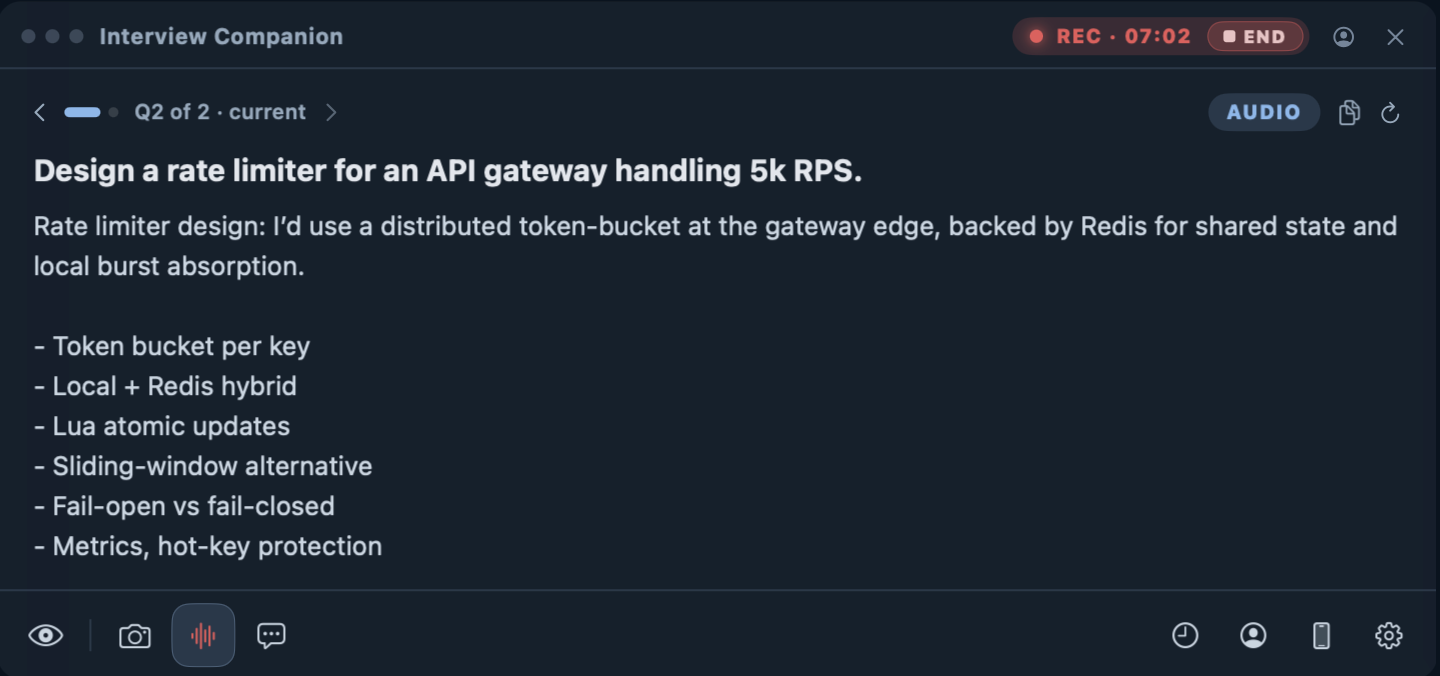
Two display modes, depending on how you work:
- Spoken mode — a complete, natural-sounding answer you can follow end to end.
- Concise mode — a one-line summary plus a few keyword bullets, like a prompter card. When you blank, one glance brings your own preparation back, and the words you actually say are still yours.
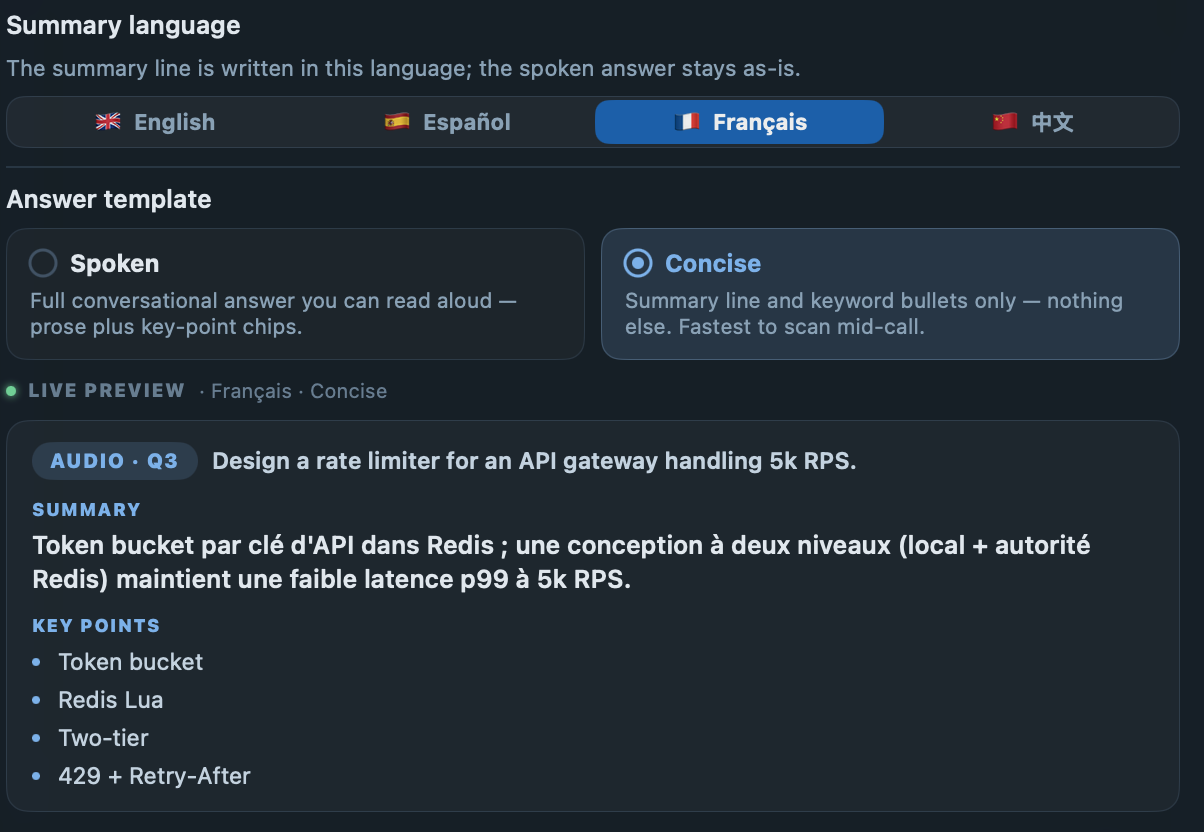
For non-native speakers there is one more piece: the summary line can be set to your language (say, Chinese) while the full answer stays in English. When an interviewer talks fast or with a heavy accent and you are not sure what was just asked, the summary tells you instantly — that alone removes a huge amount of panic.
And because the receiving side is decoupled from the capturing side, answers can land on a paired iPhone or any browser — the capture is native system audio: no browser tab, no virtual audio driver, no bot joining your call.
How it works under the hood
Context engineering: the profile
The profile from step one is more than a text dump. Each fragment carries a title, keywords, and a body, organized into domains (identity, experience, projects, behavioral stories, …) — small, retrievable units rather than one long document.
At answer time we do not dump the whole profile into the model. Each question is classified (behavioral / resume deep-dive / skill / preference / generic) and matched against fragments by keywords and embeddings. Identity is always included; behavioral questions force your story fragments in. The selected fragments are assembled into a single candidate-profile block, so the model answers as you — with your stack, your projects, your numbers. The extracted role context rides along in the system prompt, so answers mirror the language of the job you are actually interviewing for.
Loop engineering: stacking accuracy
Answer quality is a pipeline, and every stage compounds:
- Hearing the question right. Transcription is upstream of everything, so your profile's keyword set doubles as a vocabulary hint for speech-to-text — domain terms like framework names transcribe correctly instead of becoming soundalikes.
- Reconstructing the question. Real interviewers ramble. Segments are merged and classified so a question split across pauses is answered once, as one question.
- Learning from every mock round. Practice answers are distilled into an answer bank, tagged by theme. The mock rotation deliberately picks themes you have not practiced yet. In a real interview, when a behavioral question matches a theme you drilled, your own rehearsed answer is injected as the reference shape — the model adapts it to the interviewer's exact wording instead of writing from scratch.
Each pass through that loop — practice, distill, retrieve — makes the next answer more accurate and more recognizably yours.
Follow-up questions: the hard part
The question after the question is where generic tools fall apart. “Why?”, “what about scale?”, “how did that play out?” — treated as standalone questions, these produce answers that restart from zero and sound oblivious. We handle them explicitly:
- A classifier separates new questions from short follow-ups — brief utterances with back-pointers (“that”, “it”) or known follow-up shapes.
- For a follow-up, the retrieval query is expanded with the previous turn's topic keywords, so fragment matching stays on-topic even when the question itself is three words long.
- The last conversation turns ride along as context, so the answer continues the thread — it references what you just said instead of contradicting it.
- Coding threads keep their own context: after a screenshot solve, “now optimize it” edits the same solution rather than producing a brand-new one.
Coding questions, paced like an interview
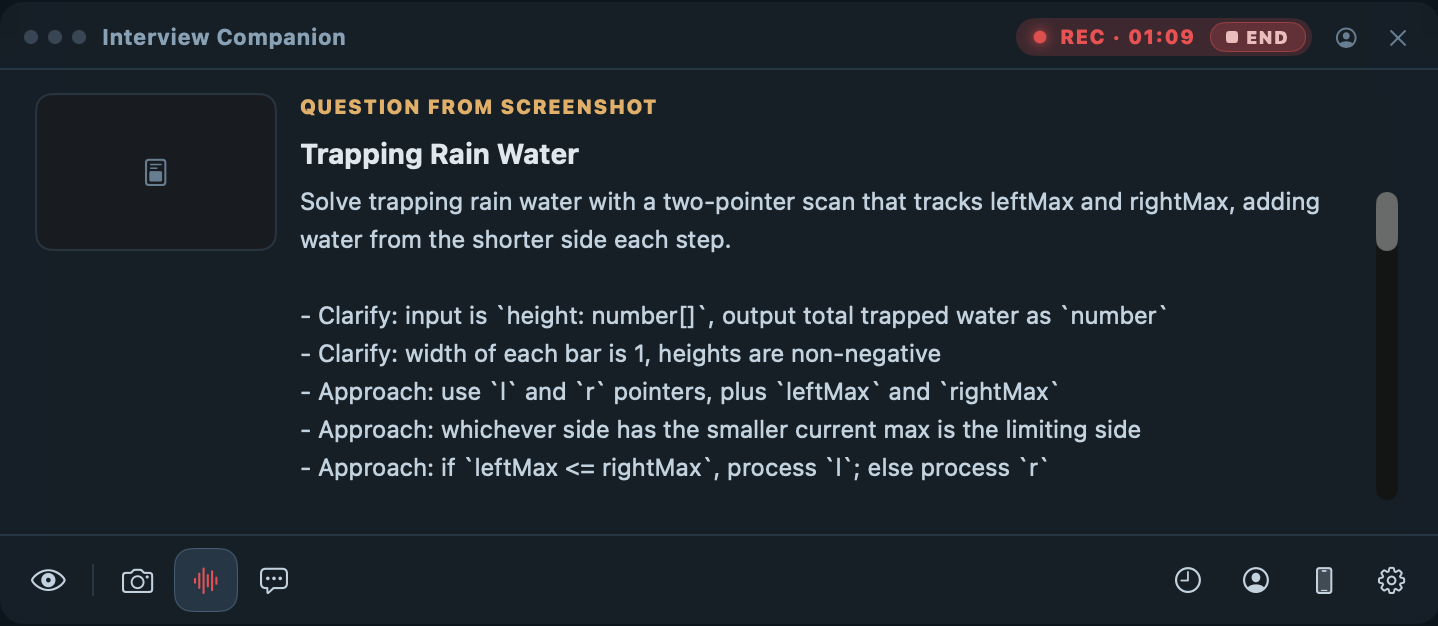
For coding rounds, a global hotkey screenshots the problem and the answer comes back in the rhythm an interview actually wants: a one-line summary, the clarifying questions worth confirming with the interviewer (edge cases, input bounds), the approach, then the code. You demonstrate process, not just output — and follow-ups stay attached to the same solution.
What it is — and what it is not
interviewco.ai does not learn your craft for you, and it will not invent a background you do not have. The preparation is still yours; the experience is still yours. What it does is make sure the preparation survives contact with your nervous system: practice loops that build real confidence before the interview, and a prompter that catches you in the seconds when pressure drops the thread.
Your mind going blank was never proof you could not do the job. It just needed a backstop.